Manipulation with two-stage training#
This example trains a Franka arm to reach a graspable pose over a randomly placed box, then hands off to a scripted close-and-lift. It uses a two-stage recipe common in sim-to-real manipulation: first train a teacher policy on privileged ground-truth state, then distill it into a student policy that sees only stereo camera images. The teacher learns fast because it has perfect information; the student inherits that behavior while depending on inputs a real robot can actually produce.
The complete code lives in examples/manipulation/, split across four files:
grasp_env.py: the environment, shared by both stages.grasp_train.py: configs and the training entry point for both stages.behavior_cloning.py: the student policy network and its distillation loop.grasp_eval.py: rolls out either policy.
This page explains the design; the files are the source of truth for the code.
Why two stages#
A grasping policy ultimately has to run from camera images, because a real robot has no direct readout of an object’s pose. Training a vision policy from scratch with reinforcement learning is slow: the network spends most of its samples learning to see before it can learn to act.
The recipe here separates those two problems.
Stage 1, the teacher: reinforcement learning on privileged state, the exact end-effector and object poses read straight from the simulator. With perfect observations, a small MLP learns the task quickly across thousands of parallel environments.
Stage 2, the student: a convolutional network that takes stereo RGB images and imitates the teacher through behavior cloning. It never queries the RL reward; it just reproduces the teacher’s actions from pixels.
The teacher is a means to an end. The deployable artifact is the vision student.
The environment#
Both stages share GraspEnv. It follows the same gym-style shape as the locomotion and drone hover examples: a reset() that returns observations and a step(actions) that returns (observations, rewards, dones, infos).
The scene holds a ground plane, a 7-dof Franka Panda arm with a parallel-jaw gripper, and a red box. Each reset randomizes the box: its position is drawn from a patch in front of the robot and its yaw is perturbed, so the policy cannot memorize a single target.
# random object state, sampled per environment on reset
random_x = torch.rand(self.num_envs, device=self.device) * 0.4 + 0.2  # meters
random_y = (torch.rand(self.num_envs, device=self.device) - 0.5) * 0.5
random_yaw = (torch.rand(self.num_envs, device=self.device) * 2 * math.pi - math.pi) * 0.25  # radians
Privileged observations#
The teacher’s observation is a 14-dimensional vector of ground-truth state, returned under the key "policy":
obs_components = [
    finger_pos - obj_pos,  # gripper-to-object offset, shape ([n_envs,] 3)
    finger_quat,           # gripper orientation (w, x, y, z)
    obj_pos,               # object position, shape ([n_envs,] 3)
    obj_quat,              # object orientation (w, x, y, z)
]
Quaternions are scalar-first (w, x, y, z), following the Genesis World convention. This state is only available in simulation, which is exactly why it stays confined to the teacher.
Vision observations#
The student instead reads two RGB cameras placed to the left and right of the workspace. get_stereo_rgb_images() stacks them along the channel axis and normalizes to [0, 1]:
rgb = env.get_stereo_rgb_images(normalize=True) # shape (n_envs, 6, H, W); 3 left + 3 right, H = W = 64
On a CUDA backend with the optional Madrona batch renderer installed, the cameras render all environments in one pass. Otherwise the environment falls back to the built-in rasterizer, so the example runs without Madrona:
if _ENABLE_MADRONA and gs.backend == gs.cuda:
    CameraOptions = BatchRendererCameraOptions
    cam_kwargs = dict(use_rasterizer=True)
else:
    CameraOptions = RasterizerCameraOptions
    cam_kwargs = {}
The cameras are added with scene.add_sensor(...); see Camera sensors for the sensor API and Parallel simulation for how batched environments run.
Actions and control#
An action is a 6-vector: a delta position and a delta orientation for the end-effector, each scaled by action_scales (0.05 per step). The environment converts that Cartesian delta into joint targets with damped-least-squares inverse kinematics and drives the arm through position control:
q_pos = self._dls_ik(action)          # Cartesian delta -> joint targets
q_pos[:, self._fingers_dof] = self._gripper_open_dof
self._robot_entity.control_dofs_position(position=q_pos)
The gripper stays open throughout the learned rollout. The policy’s job is to align the gripper to a graspable pose, not to close it. The actual grasp and lift is a scripted sequence (grasp_and_lift_demo) that runs after the policy has positioned the arm.
Reward#
A single reward term drives learning: keypoint alignment. Reference keypoints are attached to both the gripper and the object, and the reward shrinks as the two sets of keypoints coincide:
reward_scales = {
    "keypoints": 1.0,
}
def _reward_keypoints(self) -> torch.Tensor:
    ...
    dist = torch.norm(finger_pos_keypoints - object_pos_keypoints, p=2, dim=-1).sum(-1)
    return torch.exp(-dist)  # 1.0 when perfectly aligned, decaying to 0
Aligning keypoints constrains position and orientation at once, so no separate dense shaping terms are needed. This is the only reward.
Stage 1: train the teacher with RL#
Stage 1 trains the teacher with Proximal Policy Optimization (PPO) from the rsl_rl library, the same trainer used by the locomotion and hover examples. The actor and critic are small MLPs reading the "policy" observation group.
Install the dependencies:
pip install tensorboard "rsl-rl-lib>=5.0.0"
Start training:
python examples/manipulation/grasp_train.py --stage=rl
By default this runs 2048 parallel environments (-B/--num_envs) for 300 iterations. More environments give PPO more samples per update; the ceiling is your GPU memory. See Efficient environment design for how to push batch sizes higher.
Monitor progress with TensorBoard:
tensorboard --logdir=logs
A successful run produces a reward curve that climbs and plateaus near 1.0, the value the keypoint reward approaches at perfect alignment:
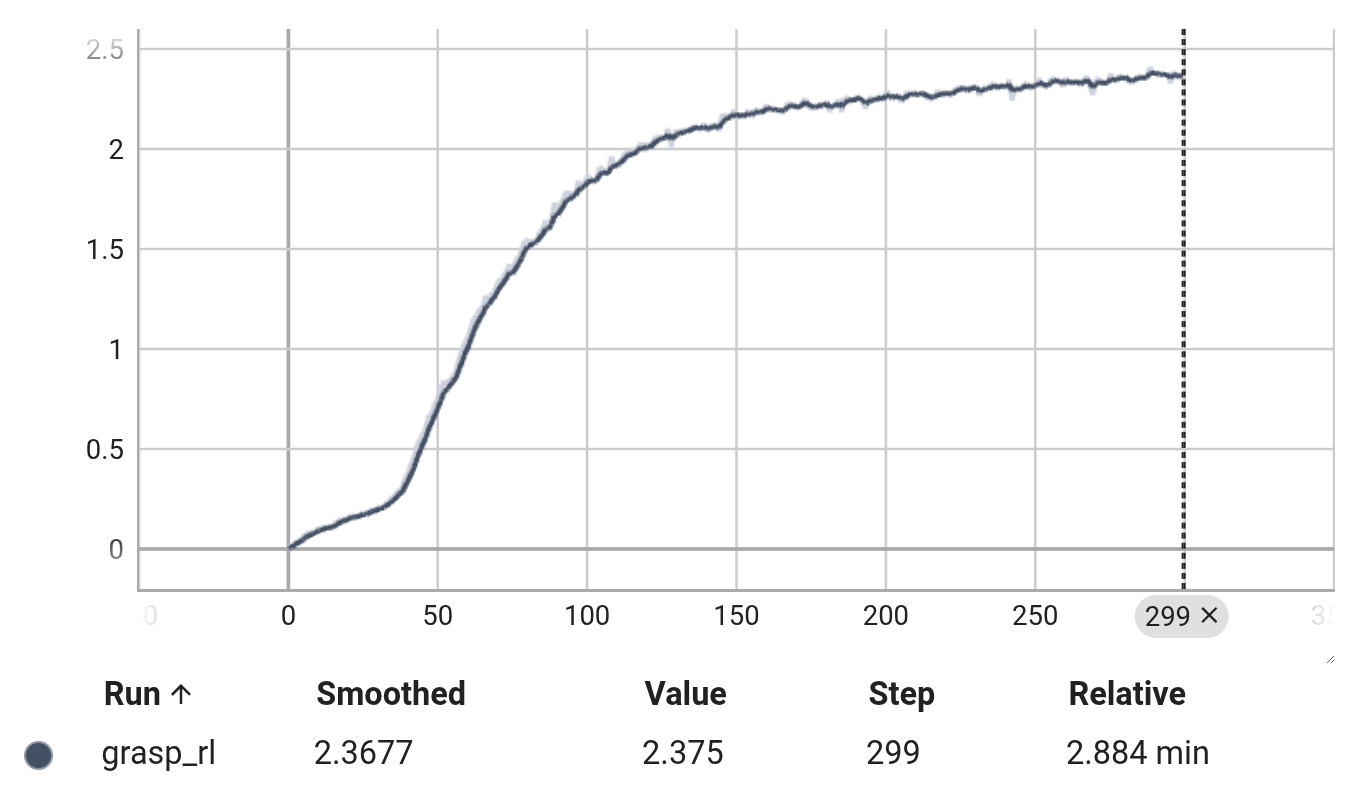
Checkpoints are written to logs/grasp_rl/ as model_<iter>.pt. Stage 2 loads the latest one automatically.
Stage 2: distill into a vision student#
Stage 2 trains the vision student, defined in behavior_cloning.py. The network is a Policy module with three parts:
Shared stereo encoder: one CNN applied to the left and right images, whose features are fused by a linear layer. Sharing weights across both views keeps the encoder small.
Action head: an MLP that predicts the 6-dof action from the fused visual features concatenated with the 7-dim end-effector pose.
Pose head: an auxiliary MLP that regresses the object’s pose (
xyzplus quaternion). It is a training aid that pushes the encoder to represent object geometry; it is not used at deployment.
Training minimizes an action-imitation loss plus the auxiliary pose loss:
action_loss = F.mse_loss(pred_action, batch["actions"])   # match the teacher
pose_loss = pose_left_loss + pose_right_loss              # position MSE + quaternion distance
total_loss = action_loss + pose_loss
Data comes from the teacher online, with a DAgger-style safeguard against covariate shift: at each step the student proposes an action, and the environment executes it only when it is close to the teacher’s, otherwise falling back to the teacher. This keeps rollouts near states the teacher handles well while still exposing the student to its own mistakes:
# DAgger: trust the student near the teacher, defer to the teacher otherwise
action_diff = torch.norm(student_action - teacher_action, dim=-1)
condition = (action_diff < 1.0).unsqueeze(-1).expand_as(student_action)
action = torch.where(condition, student_action, teacher_action)
Run it after the teacher exists:
python examples/manipulation/grasp_train.py --stage=bc
This stage loads the newest teacher checkpoint from logs/grasp_rl/, so train the teacher first. It runs on only 10 environments because rendering, not simulation, is now the bottleneck. Losses and checkpoints (checkpoint_<iter>.pt) land in logs/grasp_bc/.
Evaluation#
Roll out either policy with grasp_eval.py. Evaluation opens the viewer and, after the policy positions the arm, runs the scripted grasp-and-lift so you can see the full pick.
Teacher policy, reading privileged state:
python examples/manipulation/grasp_eval.py --stage=rl
Student policy, reading only the stereo cameras. Pass --record to save the rendered views to logs/grasp_bc/ as video:
python examples/manipulation/grasp_eval.py --stage=bc --record
Note
The evaluation script reuses the configuration pickled during training (logs/<exp>_<stage>/cfgs.pkl), so the environment matches the one the policy was trained in. It also flips the box to a free (non-fixed) body for evaluation, letting the arm actually lift it.
See also#
Training locomotion policies with RL and training drone hovering policies with RL for single-stage PPO examples with the same environment shape.
Camera sensors for the rendering API behind the stereo observations.
Control your robot for the inverse-kinematics and position-control primitives the environment uses.